 爱华网
爱华网本文开启ios原生虚拟内存教程只适合于 iOS 5.1.1~6.1.2系统,iOS 6.1.2 对iPhone4的内存要求太高了,打开没几个软件就出现很多LowMemory的错误报告log,成功开启虚拟内存即可解决问题(就像Win PC用硬盘空间弥补内存空间不足的情况)。
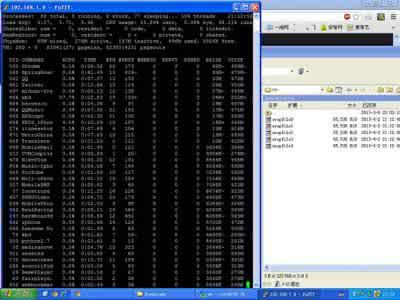
我按照内存使用率,从高到低,将部分显出出来,给懂的人看,有图有真相!
一共运行88个程序,包括真实赛车3,英雄战歌等多款大作,自带的512M内存,只剩下8824K自由空间,而此时虚拟内存调用320MB磁盘空间,完全感觉不到丝毫卡~
以下是相关文件说明,如果觉得不好,把com.apple.virtualMemory.plist和 com.apple.dynamic_pager.plist删除,把com.apple.SpringBoard.plist 还原,然后在命令控制台中输入reboot就可以恢复到之前的时候,不用从刷手机的:
com.apple.virtualMemory.plist 放在 /private/var/preferences
com.apple.dynamic_pager.plist 放在 /System/Library/LaunchDaemons
在 /System/Library/LaunchDaemons/com.apple.SpringBoard.plist 必须进行手动的修改,修改内容往下看。(记得备份)
在 /private/var 里新建VM的文件夹,权限设置如图:
全部完成后,重启手机,/private/var/VM 出现swapfile0就说明成功。
软件名称: iFiles(苹果资源管理器)1.9.3
com.apple.SpringBoard.plist 按照规则添加红色部分,建议使用iFile进行修改:
<?xml version="1.0" encoding="UTF-8"?><!DOCTYPE plist PUBLIC "-//Apple//DTD PLIST 1.0//EN" "http://www.apple.com/DTDs/PropertyList-1.0.dtd"><plist version="1.0"><dict> <key>EmbeddedHomeScreen</key> <true/> <key>HighPriorityIO</key> <true/> <key>Label</key> <string>com.apple.SpringBoard</string> <key>MachServices</key> <dict> <key>PurpleSystemAppPort</key> <dict> <key>ResetAtClose</key> <true/> </dict> <key>com.apple.SBUserNotification</key> <true/> <key>com.apple.UIKit.statusbarserver</key> <true/> <key>com.apple.aps.alertprovider.xpc</key> <true/> <key>com.apple.bulletinboard.observerconnection</key> <true/> <key>com.apple.bulletinboard.publisherconnection</key> <true/> <key>com.apple.bulletinboard.settingsconnection</key> <true/> <key>com.apple.bulletinboard.systemstateconnection</key> <true/> <key>com.apple.bulletinboard.utilitiesconnection</key> <true/> <key>com.apple.chatkit.clientcomposeserver.xpc</key> <true/><key>com.apple.dynamic_pager</key> <dict> <key>ResetAtClose</key> <true/> </dict> <key>com.apple.icfcallserver</key> <true/> <key>com.apple.springboard</key> <dict> <key>ResetAtClose</key> <true/> </dict> <key>com.apple.springboard.UIKit.migserver</key> <dict> <key>ResetAtClose</key> <true/> </dict> <key>com.apple.springboard.alerts</key> <dict> <key>ResetAtClose</key> <true/> </dict> <key>com.apple.springboard.backgroundappservices</key> <dict> <key>HideUntilCheckIn</key> <true/> <key>ResetAtClose</key> <true/> </dict> <key>com.apple.springboard.blockableservices</key> <dict> <key>ResetAtClose</key> <true/> </dict> <key>com.apple.springboard.carditemscontroller</key> <true/> <key>com.apple.springboard.icongeneration</key> <true/> <key>com.apple.springboard.processinvalidation</key> <dict> <key>HideUntilCheckIn</key> <true/> </dict> <key>com.apple.springboard.remotenotifications</key> <dict> <key>ResetAtClose</key> <true/> </dict> <key>com.apple.springboard.services</key> <dict> <key>HideUntilCheckIn</key> <true/> <key>ResetAtClose</key> <true/> </dict> <key>com.apple.springboard.watchdogserver</key> <true/> </dict> <key>POSIXSpawnType</key> <string>Interactive</string> <key>ProgramArguments</key> <array> <string>/System/Library/CoreServices/SpringBoard.app/SpringBoard.env</string> </array> <key>RunAtLoad</key> <false/> <key>ThrottleInterval</key> <integer>5</integer> <key>UserName</key> <string>mobile</string></dict></plist>